Skip to content

Workout OS · gym management

Everything your gym needs, in one place.

No setup fee. Flat pricing. Your data stays yours.

Workout OS is gym management software that runs from your phone: memberships, till, SMS and email reminders and reports in one panel, with a member app coming soon. No contract.

app.workoutos.app
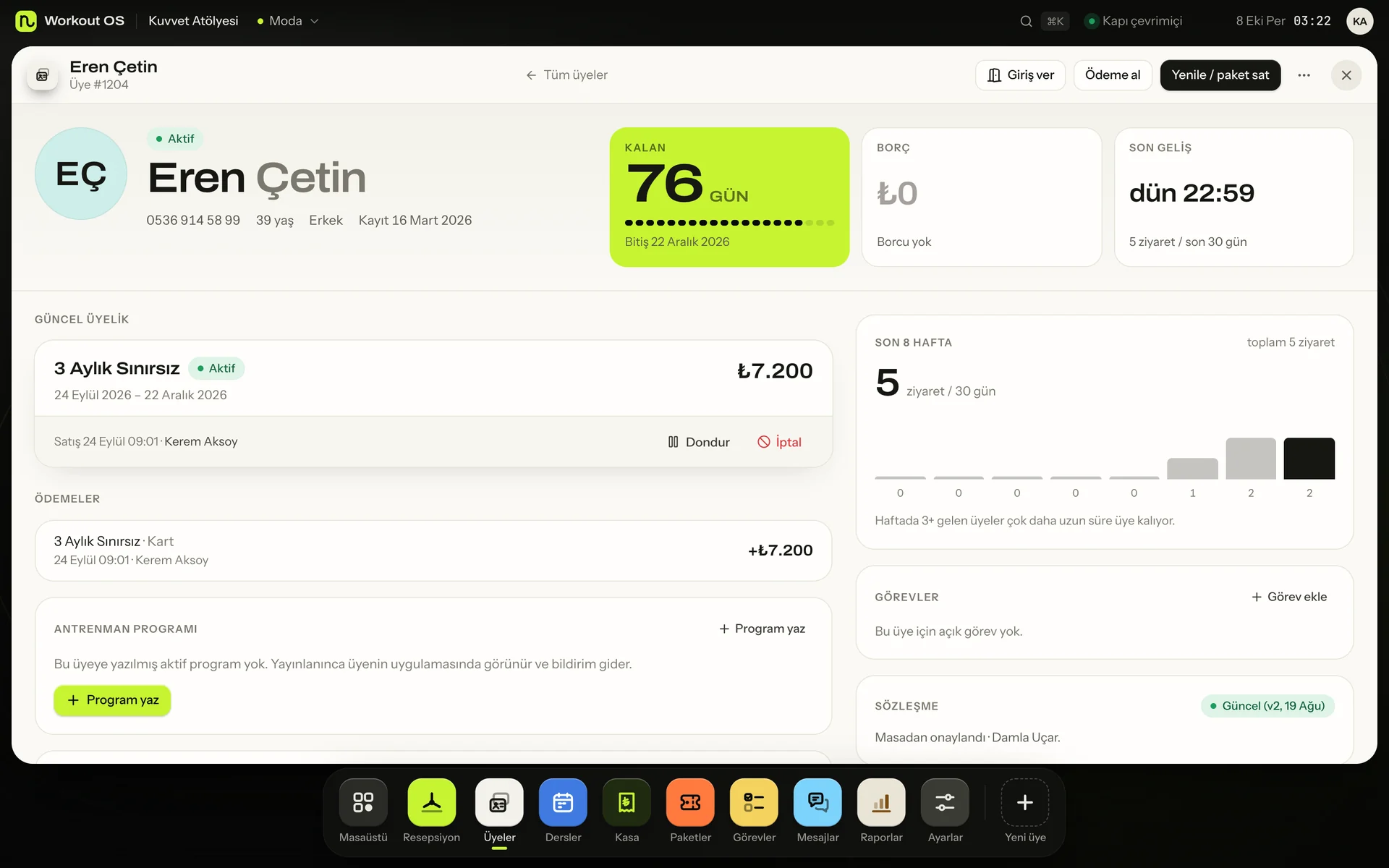
Workout OS member profile: days left, balance, current membership and payments
Workout OS on a phone: the day's till

Real screens, shown with the Turkish interface. The panel also runs in English. Sample data.

Member success

See who is drifting before they are gone.

Every night each member is compared with their own history. Someone whose visits are falling, who goes quiet as the renewal nears or who starts slowly in the first weeks reaches the trainer and the team, with the reason. Included in every plan.

  • Visits, programme adherence, renewal, return after a freeze
  • A priority-ordered list and a view for each trainer's own members
  • A draft is ready; staff send the message personally

See member success

DA

Deniz A.

Monthly membership · ends in 11 days

Example

Member success

Priority: high

  • Fewer visits

    Weekly visits 3.1 → 0.5

  • Renewal soon, low activity

    Membership ends in 11 days

Weekly visits, last 12 weeks

12 weeks agoOwn average 3.1this week

Why this order? A high-severity reason and a renewal coming up.

Not a churn prediction, a situation worth following up.

  • Review programmeTask for the trainer
  • Reach outNeutral draft ready
  • Follow-up taskPerson, date, note
Example screen. Sample data, not a real member.

What is in it

From front desk to till, one panel.

Every module works from the same data, and none of them costs extra.

01

Front desk
Find a member by name, phone or number. See days left, balance and last visit at a glance, and check them in with one tap. Membership rules (time windows, daily limit, debt, visits left) are checked for you, and any override needs a reason.

02

Memberships and packs
Build your own plans: days, time windows, daily and total visit limits. Instalments, freezes, cancellations and refunds. Closed days on bank holidays can add days back to every active membership.

03

Till
Membership payments, product sales, expenses and cash flow, day by day. Financial records cannot be edited, and the manager is told when the till does not add up.

04

Automations
Pick an event and a condition, then an action: reminders by SMS or email, or a task. Drafts are ready by reason; your staff review and send them, and every send is logged. Scenarios are unlimited on every plan.

05

Door system integration
We sell no hardware, but a gym's existing door or turnstile system can sync member access through our API, signed webhooks and a CSV feed.

06

Classes and PT
Weekly timetable, waitlist with a notification when a place opens, PT session confirmation, trainer availability and trainer payouts.

07

Reports
Revenue overview, members and churn, a busy-hours heatmap, plus package and staff reports.

08

Member app (coming soon)
Coming soon to the App Store and Google Play: members will see their membership, book classes and get notifications. It will be optional; the front desk works without it.

09

And more
Waivers and PAR-Q forms, parent and child accounts with sibling discounts, belt tracking, CrossFit workouts and scores, locker assignment.

Front desk

Check-in in one tap.

The rules are checked for you: time window, daily limit, debt and visits left. If a rule is bent, the desk records who approved it and why.

  • Search by name, phone or member number
  • Today's check-in list and a live 'in now' count
  • Works on a phone, tablet or computer

Check-in

  • Membership windowGym Monthly · 06:00–24:00
  • Daily visit limit1 of 2 used
  • BalanceNo late instalments
  • Visits left18 days remaining
Checked inone tap at the desk

Automations

Scenarios do the chasing.

Late instalment, ending membership, a member who stopped coming. Choose the event and the action, and the reminder draft is ready; your staff review it and send it by SMS or email.

More on member messaging

Scenarios · unlimited

  • IfInstalment 3 days late

    ThenSMS reminder draftAlert at the front desk
  • IfMembership ends in 7 days

    ThenSMS or email
  • IfHasn't visited in 14 days

    ThenTask for the front desk

Why gyms switch

No lock-in is the point.

  • 01

    No lock-in

    No commission: you collect from your own clients, directly. Monthly billing, cancel any time. Your full data, free to export whenever you like (90 days to export after cancelling), and free migration from your old tool.

  • 02

    Messages ready by reason

    Reminders and drafts come ready for each reason, such as package ending, payment due or follow-up, across SMS and email. Staff review and send, and every send is logged. Nothing goes out in bulk automatically.

  • 03

    Built for in-person work

    No per-client pricing for studios. Session packs and balances track themselves. Clients pick a reformer spot, and the waitlist fills cancelled places automatically.

Gym pricing

Priced by active members.

Monthly prices in USD, excluding taxes. Every feature is in every plan.

Starter30 members · 1 branch
$0
Gym500 members · 1 branch
$79/month
Pro1,500 members · 3 branches
$149/month
ChainUnlimited members · Unlimited branches
from $299/month

FAQ

Gym questions.

What does Workout OS do for a gym?

Workout OS is gym management software that runs from your phone. It handles check-in at the front desk, memberships and freezes, instalments, the till and reports, classes and PT, automation scenarios that prepare SMS or email reminders for your staff to review and send, and member success follow-up that flags members drifting away. A member app for iOS and Android is coming soon.

How does Workout OS help me keep members?

Member success notices every night when a member's activity drifts from their own normal (fewer visits, a programme being skipped, a renewal coming up with little activity, a slow start for new members), explains the reason with numbers, suggests a programme review, a personal message draft or a follow-up task, and measures the outcome 14 and 30 days later. It uses explainable rules, not an AI prediction, sends nothing automatically and is included in every plan.

Is there a free plan for gyms?

Yes. The Starter plan is free for good: up to 30 active members, 1 branch and 2 staff accounts, with every feature switched on (the API is read-only on the free plan).

Do I need turnstiles or card readers?

No. Workout OS is software only, and we do not sell hardware. The front desk checks members in with one tap on a phone, tablet or computer. If your gym already has a door or turnstile system (24/7 access, face recognition, a relay controller), it can connect to Workout OS: our API, signed webhooks and an allowed-members CSV feed tell it who may enter and let it report entries back. The API and webhooks are on every paid plan; the free plan has a read-only API.

Can I move my members from my current software?

Yes, from a CSV or spreadsheet export. The importer recognises common column names, shows a preview and flags duplicates before anything is imported. It is free, and an import can be undone.

Can I leave and take my data with me?

Yes. The owner can download a complete export at any time for free, and you keep 90 days to export after cancelling. There is no contract and no cancellation fee.

Control and integrations

Numbers that add up. Data that can leave.

On every plan: nightly consistency checks, files your accountant can import, an open API and free migration.

Consistency checks

Problems reach you before they grow.

Every night, and right after the relevant change, records are checked against each other. Each issue lands in an Issues inbox with an explanation and a suggested fix. Safe fixes take one click; anything else you can ignore.

  • Active membership with an unpaid instalment
  • Paid, but no membership created
  • Frozen membership the door still allows
  • Possible duplicate member, overlapping memberships

Accounting export

A file for your accountant, in one click.

Reports → Accounting turns a period's payments, refunds, sales and expenses into a journal or transaction list, or into Xero and QuickBooks Online bank-statement files that follow their documented column layouts.

  • Journal and transaction list (CSV)
  • Xero and QuickBooks bank import formats
  • Editable account codes per business
  • Not e-invoicing; amounts are gross (VAT is not split)

Open API

The API is not an enterprise extra.

REST API, signed webhooks, an event feed, ICS calendar feeds and an OpenAPI 3.1 spec. Full access on every paid plan, read-only on the free plan.

  • Webhooks: HMAC signatures, 7 attempts, resend
  • Idempotency-Key on writes, rate limits by plan
  • Access feed for door and turnstile systems
  • Health data never leaves through the API
Developers

Migration

Switch without switching off.

A multi-file wizard, a validation report before import, parallel running with your old tool and reconciliation. Or let us do it, free.

  • Members, memberships, payments, visits, bookings
  • Close the old tool when the checklist is green
  • Full export at any time, free
  • 90 days of access after closing
How migration works

Demo

See your gym in 20 minutes.

We use your own member list and membership types. No setup fee, no contract.